The Database
The Central Memory: Giving "Amy" a Brain
The Problem: Short-Term vs. Long-Term Memory Imagine hiring a brilliant assistant who reads every email instantly and works 24/7, but suffers from severe short-term memory loss. Once she finishes a task, she forgets it ever happened.
That is what our automation layer (n8n or any script) is on its own. It processes data in the moment, but it has no state.
To build a true Digital Employee, we need to give her Long-Term Memory. She needs a central place to remember:
Who is this agent?
What is the status of the deal at 123 Maple Ave?
When is the inspection contingency due?
We call this component The Central Memory (The Database).
Why a Proper Database? (vs. Spreadsheets)
You might be tempted to just use a Google Sheet or Airtable as the backend. For a compliance-heavy Real Estate Service, this is insufficient. We require a true Relational Database for three specific reasons:
1. The "Liability Shield" (Data Access Policies) Real estate deals contain sensitive financial data (Social Security numbers, bank statements). We need a database capable of Row Level Security (RLS). This allows us to write a rule at the database level that says:
"Agent A can NEVER see Agent B's deals."
Even if our application code has a bug, the database itself will reject the request. This is how we avoid lawsuits.
2. Machine Speed Spreadsheet-based tools are built for humans to click around. They have rate limits. A relational database (like PostgreSQL) handles thousands of concurrent requests from our AI agents without breaking a sweat.
3. The Source of Truth We may eventually build a mobile app, a web dashboard, or an admin panel. The Database serves as the Master Copy of all truth. It ensures that no matter what interface is used, the data remains secure and structured.
The Architecture Setup
To provision this memory, we need a cloud-hosted relational database located near our users (e.g., West US for California agents to minimize latency).
The Connection (Handshake) The Database must issue secure API keys to our Automation Layer ("The Brain").
Public Key: For frontend applications (limited access).
Service Role Key: For the backend automation (Full "God Mode" access to write/read all deals).
The Schema Blueprint
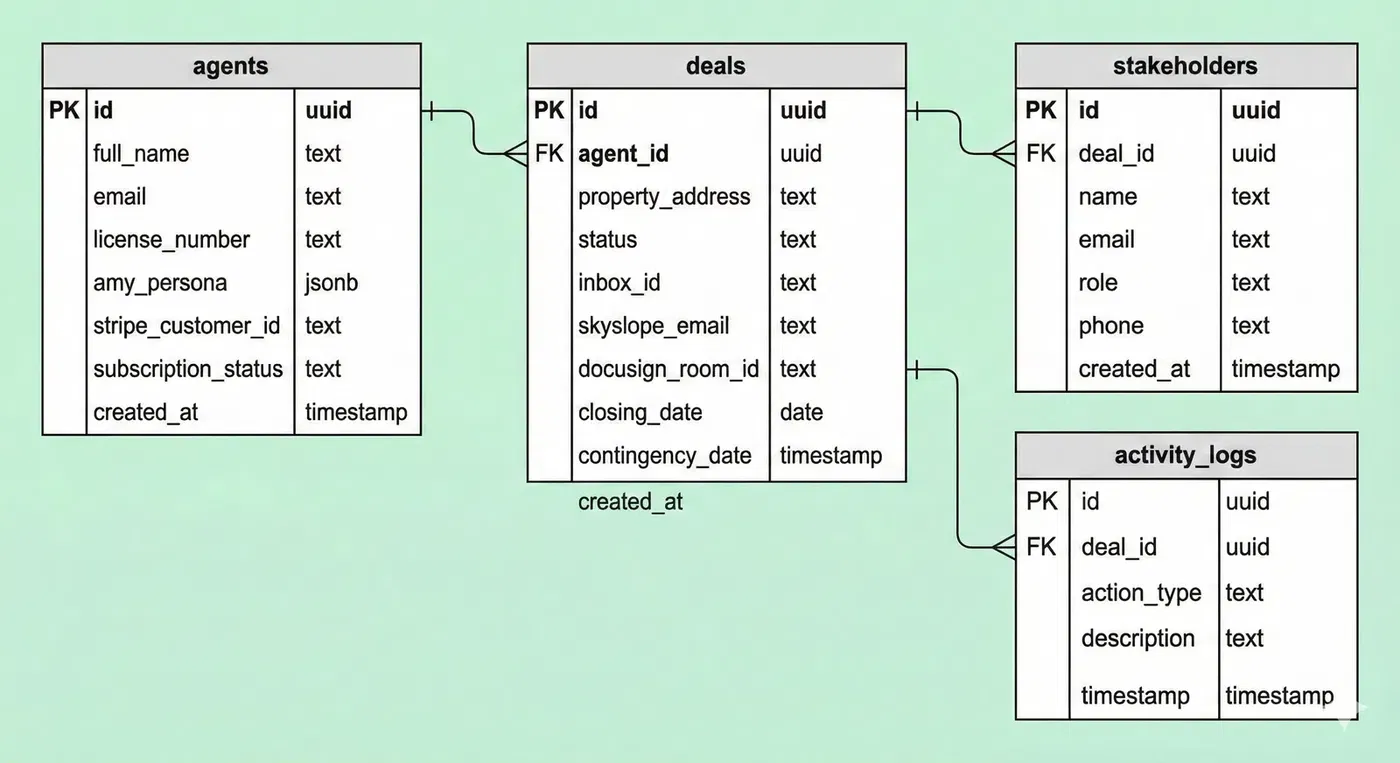
Regardless of the specific technology used, our data structure relies on four core tables. This is the "mental map" our AI uses to navigate the world.
1. The Agents Table
This table stores our customers. It links to our Authentication system.
ID: Unique Identifier.
Settings: JSON blob for "Amy's" personality (e.g., Tone: Professional vs. Friendly).
Billing: Status of their subscription (Active/Past Due).
2. The Deals Table
The container for every transaction. This is the core unit of work.
Agent ID: Links the deal to the specific agent (Owner).
Property Address: The primary label for the deal.
Status: e.g.,
Pending,Active,Closed.External Links: IDs for 3rd party tools (e.g., DocuSign Room ID, Email Thread ID).
Critical Dates: The AI extracts and stores deadlines here (Closing Date, Contingency Date).
3. The Stakeholders Table
The "Rolodex." This allows the AI to know who is emailing her.
Deal ID: Links the person to a specific deal.
Role: e.g.,
Lender,Buyer,Seller Agent.Contact Info: Name, Email, Phone.
4. The Activity Logs Table
The Audit Trail. This is crucial for liability protection. Every action the AI takes is recorded here.
Action Type: e.g.,
Email Sent,Document Filed,Draft Created.Timestamp: Exact time of the action.
Description: "Sent NHD report to Buyer Agent."
Security Policy (The Lock)
Finally, the database must enforce the Ownership Rule:
Select/Read Policy: A user can only see rows where
agent_idmatches their own Auth ID.Update/Write Policy: A user can only modify rows they own.
Summary:
The Automation is the Worker (The Hands).
The Database is the Memory (The Brain).
We must build the Memory first.
Example SQL Script:
The Master SQL Script -- 1. Setup: Enable UUID generation-- This allows us to create unique IDs for every dealcreate extension if not exists "uuid-ossp"; -- 2. Create the AGENTS table-- This links to the built-in Supabase Auth systemcreate table public.agents ( id uuid references auth.users not null primary key, full_name text, email text, license_number text, -- Settings for "Amy" amy_persona jsonb default '{"tone": "professional", "latency": "medium"}', -- Billing stripe_customer_id text, subscription_status text default 'active', created_at timestamp with time zone default timezone('utc'::text, now()) not null); -- 3. Create the DEALS table-- The container for every transactioncreate table public.deals ( id uuid default uuid_generate_v4() primary key, agent_id uuid references public.agents(id) not null, -- Property Info property_address text not null, status text default 'pending_setup', -- active, pending, closed, cancelled -- The External Links (The Integrations) inbox_id text, -- AgentMail ID skyslope_email text, -- For filing docusign_room_id text, -- For forms -- Critical Dates (Extracted by AI) closing_date date, contingency_date date, created_at timestamp with time zone default timezone('utc'::text, now()) not null); -- 4. Create the STAKEHOLDERS table-- The Rolodex. This is how Amy knows who is emailing her.create table public.stakeholders ( id uuid default uuid_generate_v4() primary key, deal_id uuid references public.deals(id) not null, name text, email text not null, role text not null, -- 'lender', 'buyer', 'seller_agent' phone text, created_at timestamp with time zone default timezone('utc'::text, now()) not null); -- 5. Create the LOGS table-- An audit trail of everything Amy does (for liability)create table public.activity_logs ( id uuid default uuid_generate_v4() primary key, deal_id uuid references public.deals(id), action_type text, -- 'email_sent', 'doc_filed', 'draft_created' description text, timestamp timestamp with time zone default timezone('utc'::text, now()) not null); -- 6. Enable Row Level Security (The Safety Lock)-- This ensures Agent A cannot read Agent B's dealsalter table public.agents enable row level security;alter table public.deals enable row level security;alter table public.stakeholders enable row level security; -- 7. Create Security Policies-- Policy: "Agents can view their own deals"create policy "Agents can view their own deals" on public.deals for select using ( auth.uid() = agent_id ); -- Policy: "Agents can update their own deals"create policy "Agents can update their own deals" on public.deals for update using ( auth.uid() = agent_id ); -- Policy: "Agents can view their own stakeholders"create policy "Agents can view stakeholders" on public.stakeholders for select using ( exists ( select 1 from public.deals where public.deals.id = public.stakeholders.deal_id and public.deals.agent_id = auth.uid() ) );Visual Example of Database: