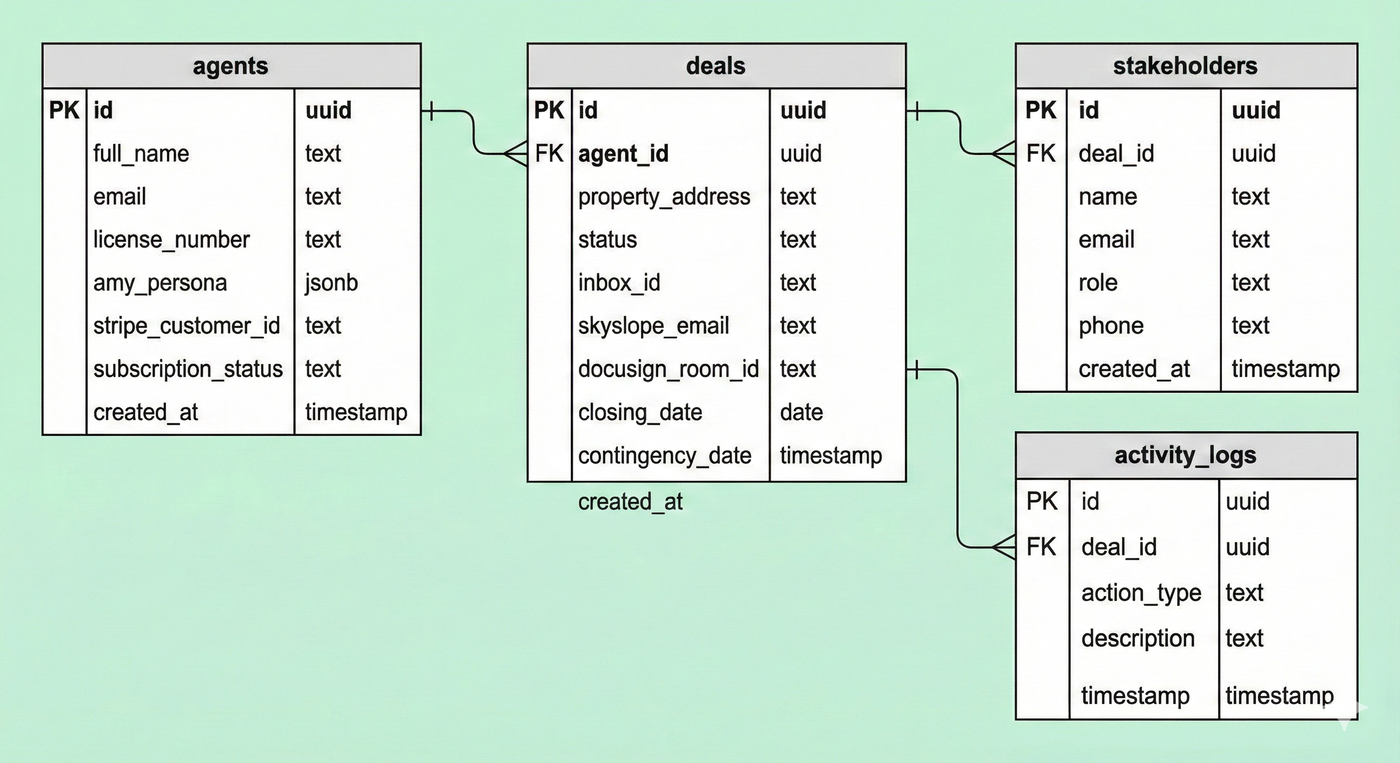
2.3 The Schema Blueprint
Copy, Paste, Deploy.
🚧 Developer Note: The schema below is a suggested starting point designed to get us to MVP immediately. It is not set in stone. As we build specific features (like billing or advanced document parsing), you should feel free to add columns, modify constraints, or elaborate on this structure as needed. Treat this as the foundation, not the ceiling.
We are going to create the tables that store Agents, Deals, and Stakeholders. We will use the SQL Editor in Supabase to do this instantly.
How to apply this:
In Supabase, look at the left sidebar. Click the SQL Editor icon (looks like a terminal
>_).Click "New Query".
Copy the code block below completely.
Paste it into the editor.
Click "Run" (bottom right).
The Master SQL Script
-- 1. Setup: Enable UUID generation-- This allows us to create unique IDs for every dealcreate extension if not exists "uuid-ossp"; -- 2. Create the AGENTS table-- This links to the built-in Supabase Auth systemcreate table public.agents ( id uuid references auth.users not null primary key, full_name text, email text, license_number text, -- Settings for "Amy" amy_persona jsonb default '{"tone": "professional", "latency": "medium"}', -- Billing stripe_customer_id text, subscription_status text default 'active', created_at timestamp with time zone default timezone('utc'::text, now()) not null); -- 3. Create the DEALS table-- The container for every transactioncreate table public.deals ( id uuid default uuid_generate_v4() primary key, agent_id uuid references public.agents(id) not null, -- Property Info property_address text not null, status text default 'pending_setup', -- active, pending, closed, cancelled -- The External Links (The Integrations) inbox_id text, -- AgentMail ID skyslope_email text, -- For filing docusign_room_id text, -- For forms -- Critical Dates (Extracted by AI) closing_date date, contingency_date date, created_at timestamp with time zone default timezone('utc'::text, now()) not null); -- 4. Create the STAKEHOLDERS table-- The Rolodex. This is how Amy knows who is emailing her.create table public.stakeholders ( id uuid default uuid_generate_v4() primary key, deal_id uuid references public.deals(id) not null, name text, email text not null, role text not null, -- 'lender', 'buyer', 'seller_agent' phone text, created_at timestamp with time zone default timezone('utc'::text, now()) not null); -- 5. Create the LOGS table-- An audit trail of everything Amy does (for liability)create table public.activity_logs ( id uuid default uuid_generate_v4() primary key, deal_id uuid references public.deals(id), action_type text, -- 'email_sent', 'doc_filed', 'draft_created' description text, timestamp timestamp with time zone default timezone('utc'::text, now()) not null); -- 6. Enable Row Level Security (The Safety Lock)-- This ensures Agent A cannot read Agent B's dealsalter table public.agents enable row level security;alter table public.deals enable row level security;alter table public.stakeholders enable row level security; -- 7. Create Security Policies-- Policy: "Agents can view their own deals"create policy "Agents can view their own deals" on public.deals for select using ( auth.uid() = agent_id ); -- Policy: "Agents can update their own deals"create policy "Agents can update their own deals" on public.deals for update using ( auth.uid() = agent_id ); -- Policy: "Agents can view their own stakeholders"create policy "Agents can view stakeholders" on public.stakeholders for select using ( exists ( select 1 from public.deals where public.deals.id = public.stakeholders.deal_id and public.deals.agent_id = auth.uid() ) );Verification
Once you run this code, verify that it worked:
Go to the Table Editor (Grid icon) on the left sidebar.
You should see 4 tables listed:
agents,deals,stakeholders,activity_logs.If you see them, your database structure is live.
Success! The Memory is ready. Now we need to give Amy her "Ears" so she can start listening to emails.
Visual Representation: